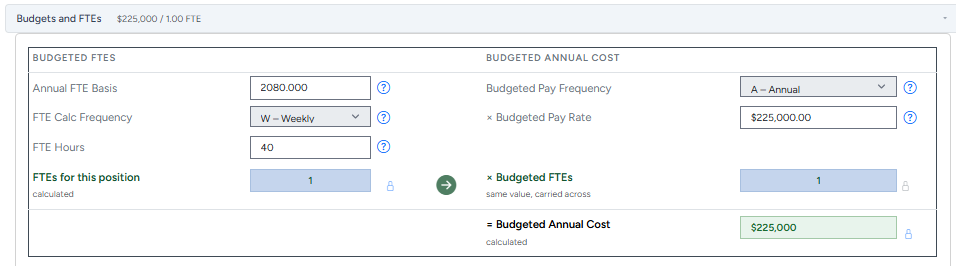
The formula
FTE (Full-Time Equivalent) expresses how much of a full-time schedule a position represents. A full-time role is 1.0 FTE. A half-time role is 0.5 FTE. Two people each working half-time in the same position add up to 1.0 FTE between them.
FTE = Hours ÷ Annual FTE Basis × Frequency Factor
Take the position's hours for its pay period, multiply by how many of those periods happen in a year, then divide by the hours that define one full-time year at this organization.
Three numbers go into the calculation:
- Hours — the number of hours the position works per pay period (e.g., 40 hours/week)
- Calculation frequency — how often that hours figure repeats: weekly, biweekly, semi-monthly, monthly, or annually
- Annual FTE basis — the number of hours that count as "full-time" for a year at this organization, usually 2,080 (40 hours × 52 weeks), but not always — some organizations use 2,000, some use fewer for union or shift-differential reasons
Frequency factors
The frequency determines how many times per year the hours figure repeats:
- Weekly — × 52
- Biweekly — × 26
- Semi-Monthly — × 24
- Monthly — × 12
- Annual — × 1 (hours are already annual)
Worked example: a standard full-time role
A position works 40 hours/week, paid weekly, at an organization where 2,080 hours defines full-time for the year.
40 hours × 52 (weekly factor) ÷ 2,080 (annual basis) = 1.000 FTE
That's the expected result for a standard 40-hour role — the math should always land on 1.0 for a textbook full-time schedule. If it doesn't, the annual FTE basis is usually the number that's wrong, not the hours.
Worked example: a part-time role
A position works 20 hours/week, paid weekly, same 2,080-hour basis.
20 hours × 52 ÷ 2,080 = 0.500 FTE
Half the hours, half the FTE — this is the case most people calculate correctly by hand. Where it gets error-prone is the next part: what that FTE actually costs.
From FTE to the FTE budget
FTE tells you how much of a position is filled. Turning that into an FTE budget — what the position actually costs at that FTE — doesn't follow automatically: it depends on pay rate and pay frequency, which can use a different annual basis than the FTE calculation did. This is the step most manual spreadsheets get wrong, especially for hourly positions.
Example: An organization uses a 35-hour week as its full-time standard (annftehour = 1,820), not the more common 2,080. A position paid $19/hour at 1.0 FTE should budget to:
1,820 × $19 = $34,580/year
Not 2,080 × $19 = $39,520 — the number you'd get by defaulting to the standard 2,080 basis instead of this organization's actual 1,820-hour full-time standard. A nearly $5,000 gap, per position, multiplied across every hourly role in the org.
The fix isn't a smarter spreadsheet formula — it's position control: making sure whatever system does this math uses each position's own annual FTE basis, not one hardcoded assumption for the whole organization. That's exactly what position control software is built to do, and it's the same discipline behind tracking budgeted vs. actual headcount across the org.
Why this needs to be calculated, not typed in
FTE and budgeted cost are both derived numbers — they come from hours, frequency, pay rate, and pay frequency, every time. The moment someone can type a number directly into an "FTE" or "Budgeted Cost" field instead of the system calculating it, that field can silently drift from the inputs that are supposed to define it. Six months later, nobody can explain why the math doesn't add up, because the number in front of them was never actually computed — it was just typed.
PowerPCS calculates FTE and budgeted annual cost automatically, on every save, from the underlying hours/frequency/rate fields — there's no override field, on purpose.