The short answer
A position is overfilled when the combined FTE of everyone currently assigned to it exceeds the position's budgeted FTE. A role budgeted at 1.0 FTE, staffed by two people at 1.0 FTE each, is overfilled at 2.0 — twice the approved cost, even though each individual assignment might look perfectly normal on its own.
The trap: overfilling almost never shows up as one big obvious mistake. It shows up as several small, individually-reasonable decisions — a transition overlap, a temporary backfill, a transfer that never got closed out — that nobody adds up until Finance asks why a department is over budget.
How positions actually become overfilled
- Transition overlaps. An outgoing employee trains their replacement for two weeks. Both are assigned to the same position at 1.0 FTE during that window — correct in the moment, but the position is now overfilled until one assignment closes.
- Transfers that don't get closed out. An employee moves to a new position, but their old assignment is never marked inactive. The old position still shows them as filling it, on top of whoever backfilled the role.
- Temporary coverage during leave. A position holder goes on extended leave; a temp or internal transfer covers the role. If the original assignment isn't reduced or paused, both count against the same budgeted slot.
- Manual hiring outside the approved structure. A manager hires someone into a role that's already filled, without going back to confirm the position's budgeted FTE first — common when hiring managers and the position-budget owner aren't looking at the same system.
Why it's expensive
An overfilled position isn't a data-entry inconvenience — it's real, unbudgeted payroll cost. A department that's overfilled on three roles by 0.5 FTE each is carrying 1.5 FTE of cost nobody approved, every pay period, until someone notices. In a spreadsheet-based process, that usually means budget season — months after the cost started accruing.
Why it's easy to miss
Most HR systems are built around the employee record, not the position. Ask "how many people are on payroll in this department?" and you'll get a fast answer. Ask "which positions are currently over their budgeted FTE, and by how much?" and in most spreadsheet-based processes, that's a manual cross-reference — budgeted headcount from one tab, actual assignments from another, reconciled by hand.
How to catch it early
Overfilled positions are calculable, not something that requires manual review — every position has a budgeted FTE and a sum of active assignment FTEs; when the second number exceeds the first, that's the flag. The catch is making that comparison run automatically, for every position, continuously — not once a quarter when someone remembers to check.
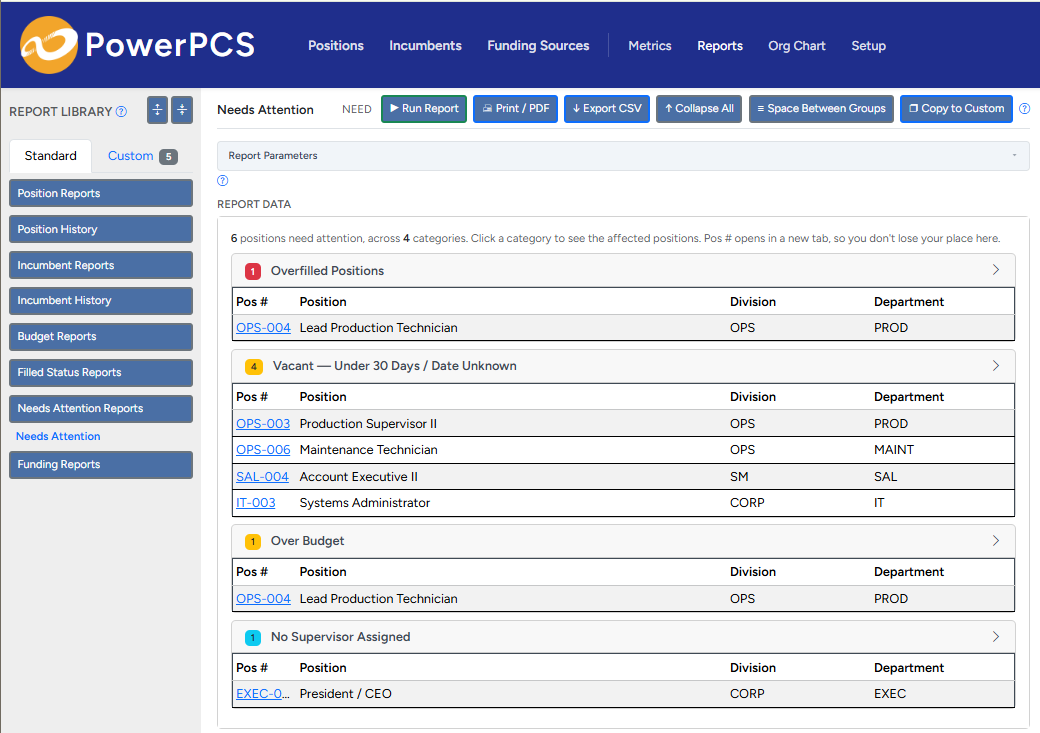
PowerPCS computes each position's status — filled, partially filled, vacant, or overfilled — automatically from live assignment data, and surfaces overfilled positions directly instead of waiting for a budget review to find them.