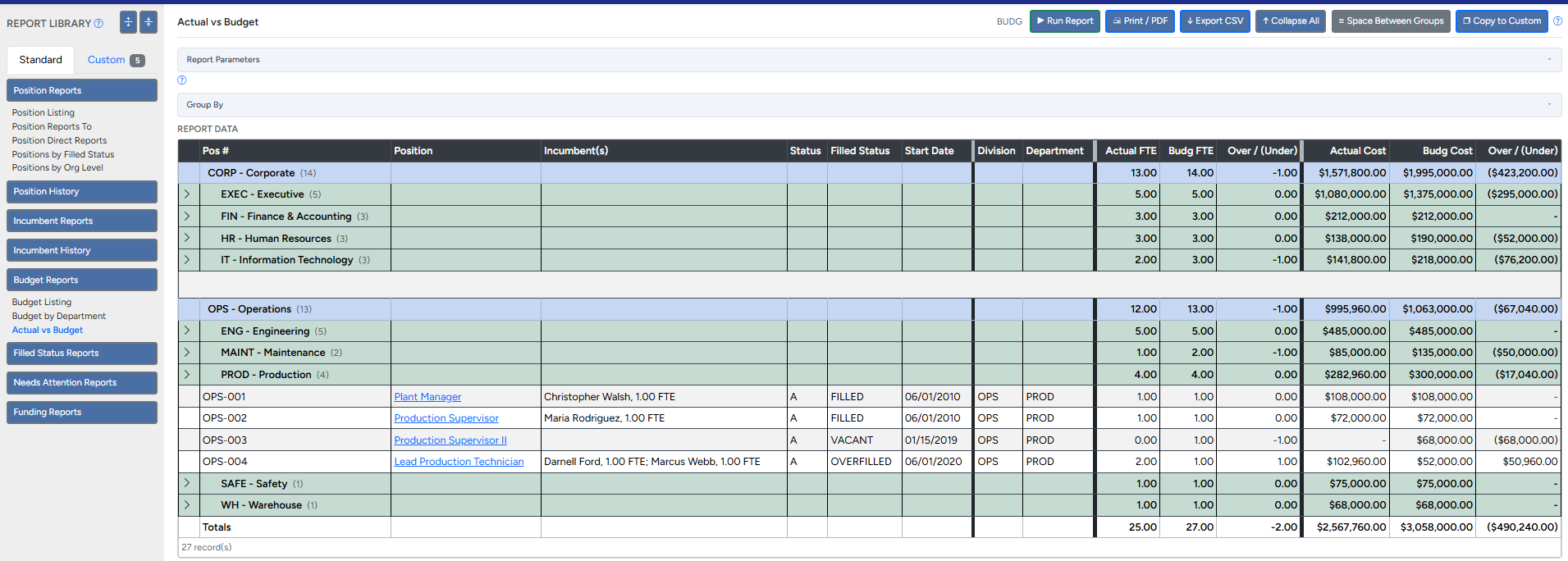
Why a plain headcount list never balances the budget
A list of employees tells you who works here today. It doesn't tell you what you planned to spend on headcount, or whether reality matches the plan. The budget question isn't "who's here" — it's "how does what we're actually paying compare to what was approved, right now?" Answering that means holding two things side by side:
- The budgeted position — the approved slot, its FTE, and its cost, whether or not anyone fills it.
- The actual incumbent — the person in it, their real FTE, and their real salary.
The gap between those two is where everything lives: a funded position no one's filled yet (vacancy), two half-people in a one-person slot (overfill), a raise that pushed a role over budget. That's what this template reconciles, and it's why it needs both the Positions tab and the Incumbents tab — not just a roster.
What the template does
Fill in your positions and your people, and the Budget vs. Actual tab does the reconciliation for you — matching each person back to their position, summing actual FTE and cost, and flagging every row as Filled, Vacant, Under-filled, or Overfilled, with the dollar and percent variance. The sample data that ships in it shows a real edge case on purpose: one position filled by two part-time people at 1.2 FTE total, so you can see an "OVERFILLED" flag light up.
That Budget vs. Actual tab also doubles as a ready-made headcount report template — budgeted vs. filled positions, FTE, and cost by department, with totals — that you can hand to a manager or the board without rebuilding it from scratch.
And here's the honest part: keeping it accurate is a job
The template works. The math is solid. But run it against a real organization for a few months and the maintenance is where it hurts:
- Every hire, termination, transfer, and raise means finding the right rows by hand.
- The Position # links between the two tabs have to stay intact — one typo and a person silently stops counting against their budget.
- Shared and split assignments have to be entered as separate rows with the FTE divided correctly.
- Funding sources have to be split and re-summed manually every time something moves.
- Nothing warns you when it drifts out of true. A wrong number looks exactly like a right one.
That upkeep — not the formulas — is the real cost of doing headcount budgeting in a spreadsheet. It's also exactly the work that quietly eats a day every month and breaks the first time you hand it to someone else.
When the spreadsheet becomes the chore, that's what PowerPCS is for
PowerPCS does everything this template does — budgeted vs. actual FTE and cost, vacancies, overfills, funding by source — except it does it automatically, from your position data, and stays correct on its own. No hand-maintained links, no re-summing, no silent drift. You also get the live org chart, change history, and reporting on top. It's the same idea as this template, grown up: tracking the budgeted positions, not just the people.
Start with the free template. When keeping it current stops being worth your time, you'll know exactly what to reach for.
Built to grow with you: the template's columns line up with the PowerPCS Positions and Incumbents import, so if you outgrow it, your data comes along — you import the same spreadsheet instead of starting over.